Turning personal knowledge into action
Summary
Unicron is a native Mac app I designed, built, and shipped solo in two months: a front end on a second brain of plain markdown files, with the Claude Code CLI as the engine. It writes a daily brief from the whole vault, turns raw meeting transcripts into clean notes with actionable plans, and pulls every open task into one list. It’s live and free at unicron.konigi.com, and the notes never leave the user’s disk.
The Problem
I think a lot about how much of my time goes into capturing and tracking information. Knowledge work, basically. Whether I'm researching a project, organizing notes and action lists from meetings, or just trying to find the note I know I saved somewhere, I depend on pulling up the right information at the right moment to connect the dots and make a decision.
When knowledge capture is slow, or doesn't happen at all, the flow of information breaks down and progress stalls with it. My favorite example is Dr. John Snow tracing the 1854 London cholera outbreak to a single water pump on Broad Street, a story Edward Tufte retells in Visual Explanations: well-organized evidence, finally gathered in one place, pointed straight at the cause. My version of the problem is smaller. Transcripts pile up unread, action items scatter across a dozen meeting notes, and the note I need is always the one I can't find.
The way we do knowledge work is changing now that LLMs can understand, or at least usefully describe, the meaning of raw information. Hand one your meeting notes, a project brainstorm, or any unstructured file you can throw at it, and you quickly get back something organized and actionable. You show up already prepared to go to town on your action list, aware of what’s going on and ready to make decisions. This is the magic of inference, and Unicron is my attempt to build a daily workflow around it.
The Product
The architecture is deliberately thin: a front end on a folder of markdown files, with the Claude Code CLI as the engine.
The vault is just a folder: notes on people, areas, projects, and meetings, plus a journal, all plain text on the user’s own disk. Nothing is locked into a database or a single LLM, so the same folder opens in Obsidian, git, or any text editor. Keep it on Dropbox or iCloud Drive and the notes follow you across devices.
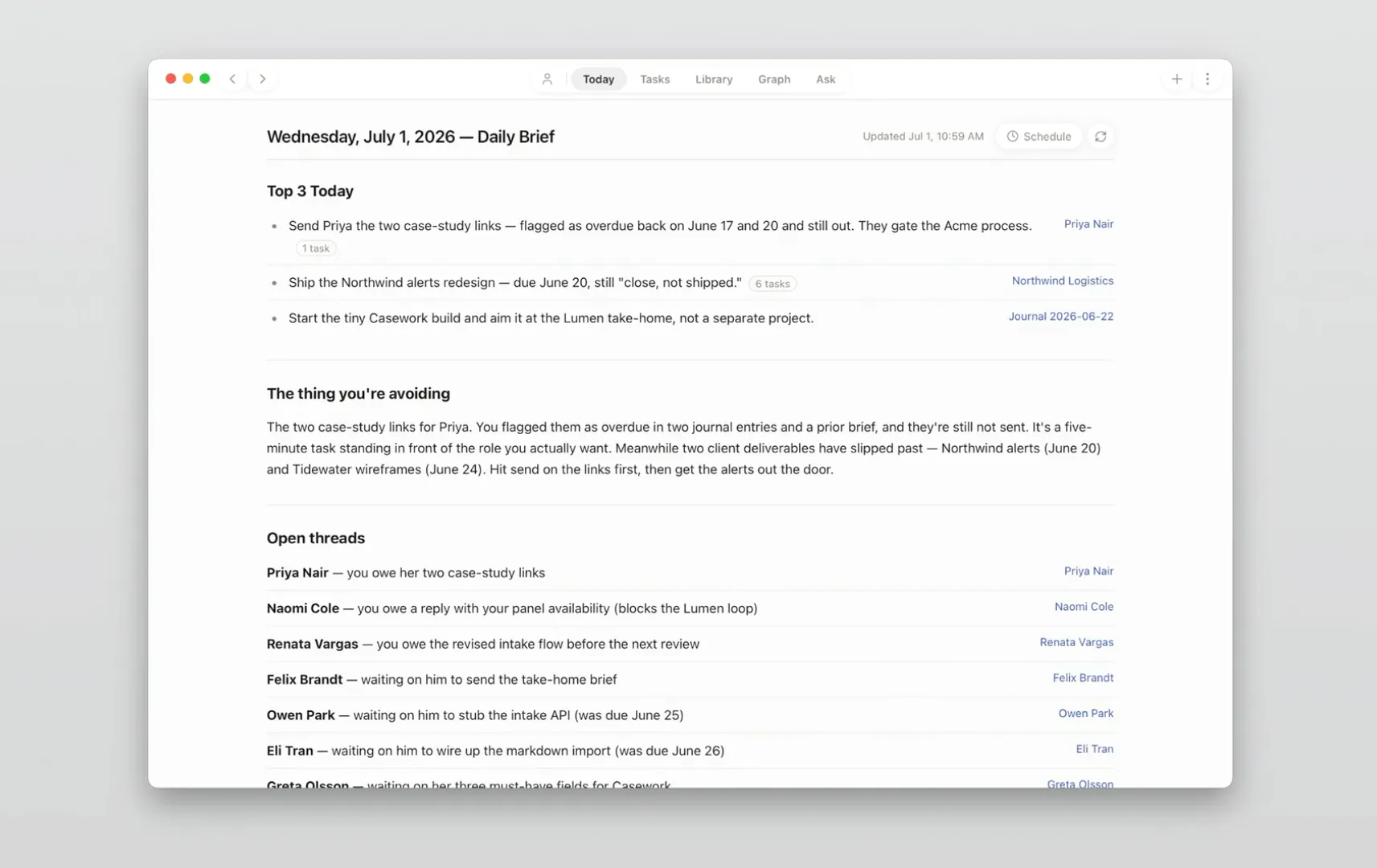
Claude does the work. It writes a daily brief from the whole vault with the top priorities, the threads you keep avoiding, and what’s due. Paste a raw meeting transcript and it becomes a clean note with an actionable plan, filed where it belongs. Schedule the brief and it runs each morning, even when the app is closed.
There’s no server. Unicron never collects anyone’s notes. When an AI feature runs, the content goes to Anthropic through the Claude CLI under the user’s own paid plan.
A Tour of the App
Today · the brief Claude writes from the whole vault, so mornings start with priorities instead of triage
The app opens to Today and the daily brief. From there you get a Library of clean markdown, projects that hold months of threads together, every open task in one sorted list, and a graph of how the vault connects.
Capture is ⌘N. Add a meeting, task, project, journal entry, person, or area without breaking flow. Paste a transcript and Claude turns it into a clean note. Stray thoughts land in an inbox from a hotkey or a phone, and Unicron files them later.
Key Decisions
The product decisions all trace back to one idea: respect the user’s files and their attention.
Plain text, no lock-in
The default way to build this is a database with an export button. The vault is instead markdown on disk, readable by Obsidian, git, or any editor. If Unicron disappeared tomorrow, nothing would be lost.
Claude Code as the engine
Instead of building an AI backend, the app runs the Claude Code CLI under the user’s existing Pro or Max plan. There’s no second subscription and no server of mine holding anyone’s notes. The app installs the CLI on first run.
Accountability, not just capture
Granola, Otter, and Notion already transcribe and summarize. What interests me is pulling action items out of the vault and forcing them through to completion, with someone accountable for each one. Tasks sorts every open item into Mine, Waiting on, and Threads.
Honesty filters better than hype
The landing page states the requirements up front: an Apple Silicon Mac, the Claude CLI, a paid Claude plan. The right person self-selects and isn’t surprised later. Distribution is free, pay-what-you-wish through Lemon Squeezy.
From Skills Project to Product
This is the natural evolution of the knowledge work I got interested in years ago, fresh out of an MLS program and working in digital libraries at Bell Labs.
My articles in Library Journal and LLRX back then were about the frontier of knowledge capture with grassroots tools like blogs and wikis, tools that gave access to anyone and empowered them to make informed decisions without being locked into cumbersome, esoteric systems. The Tools for Thought and Second Brain communities have been working this ground for years, and I’m excited to be building in it again.
Unicron started as Konigi Brain, a set of Claude skills running over my own vault. For a month I ran them from the terminal every day, and they wrote HTML files that were my morning brief and task list. They proved so useful that I spent a second month building the Mac front end around them: Tauri, React, and TypeScript, designed and developed with Claude Code. The landing page feels like the app itself: calm, white, rounded, one accent. Shipping it free-ish is deliberate. For now this is a fast way to iterate on the idea, not a revenue line.
The Craft Up Close
Reflection
You already see these ideas in Granola, Notion, Otter, Zoom, and Meet, and plenty of companies talk about pulling notes out of a dashboard and into where the work happens. Building my own end of it taught me a few things.
Prove the workflow before the UI
The Claude skills came first, run daily in the terminal for a month before any UI existed. By the time I was designing views, I already knew which workflows had earned one.
The engine can be someone else’s
Running on the Claude CLI meant no backend, no auth, no billing infrastructure, and no privacy liability. A solo designer can ship a real AI product by orchestrating a tool the user already pays for.
Filtering is a feature
Stating the requirements plainly costs some downloads and saves every refund. The page filters as much as it sells, and the people who arrive understand what they’re running.
Accountability is the open space
In the product community I don’t see many people talking about using AI this way. Getting the action items done, with someone on the hook for each one, feels like the more valuable problem, and it’s where I’ve been putting my effort.
Unicron launched free in July 2026, and I start every morning in it. What it hasn’t proven yet is the accountability bet, whether a tool that refuses to let action items rot is what finally makes a second brain indispensable. That’s the question the next versions are built to answer.
Project Details
Previous Case Study
← Evolving a product used by 1.4M+ creatorsNext Case Study
Scaling design quality across the team →